
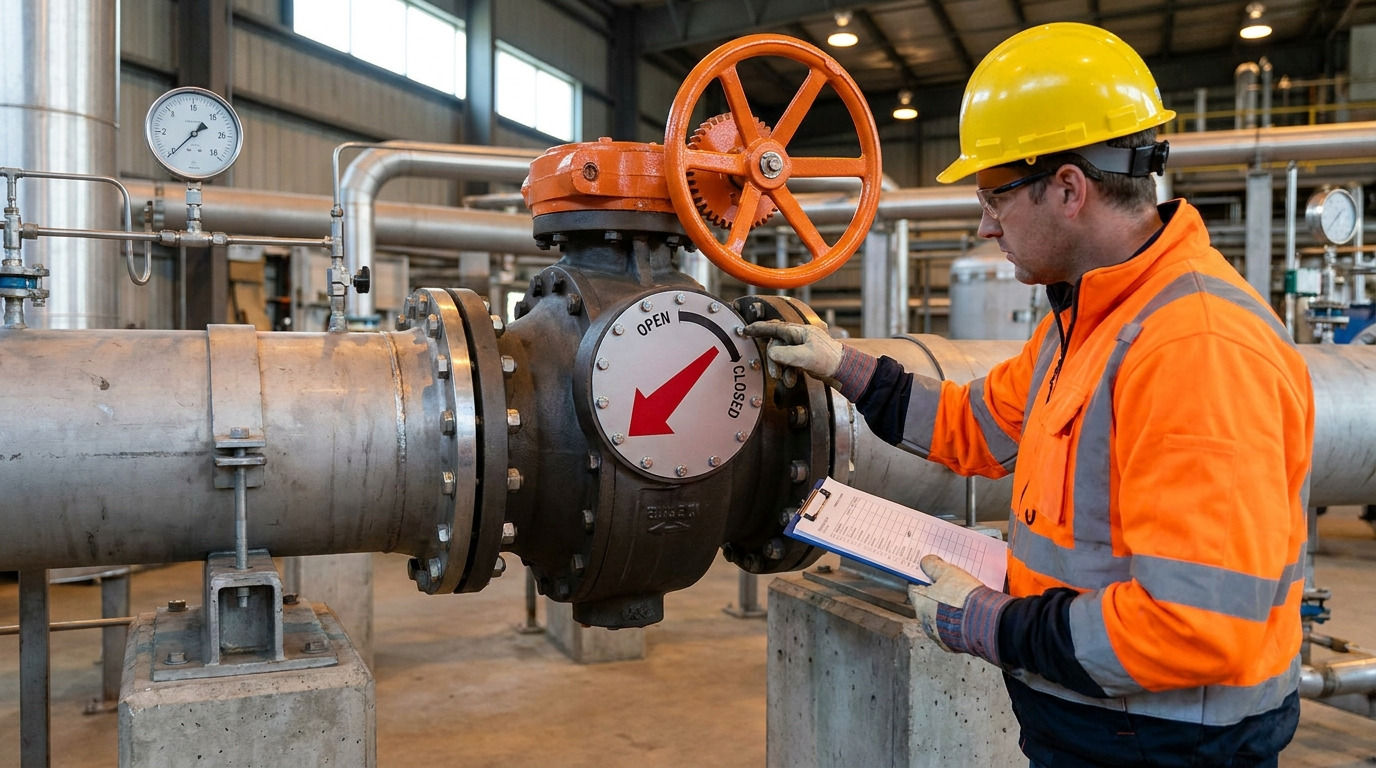
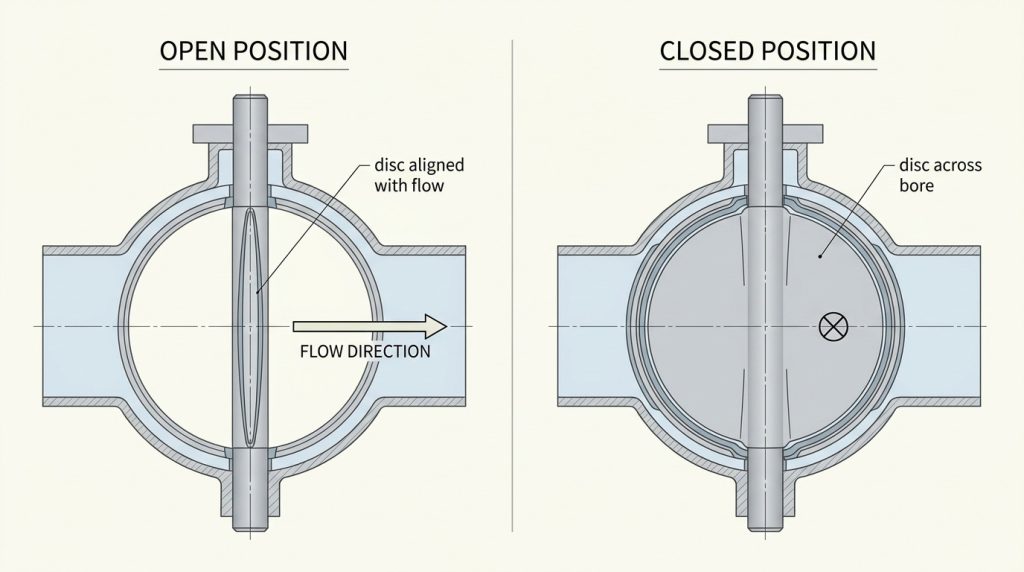
A butterfly valve is open when the disc turns parallel with the flow path and closed when the disc turns perpendicular across the bore. In practical terms, the butterfly valve open and closed position is usually identified by the handle direction, gearbox pointer, actuator indicator, travel stops, or a position switch.
If you are checking an industrial butterfly valve in a plant, drawing, or project specification, the useful question is not only “which way is open?” You also need to know when the indicator can be wrong, how far the disc has actually traveled, and whether “closed” means shutoff or only a closed-position command.
How to Identify Butterfly Valve Open and Closed Position
The reliable way to identify the position is to match the operator indication with the actual disc movement expected for that valve. A butterfly valve is a quarter-turn valve, so the disc normally rotates about 90 degrees between fully open and fully closed.
What does the disc do at full open?
At full open, the disc is turned so its thin edge faces the flow and the disc face is generally parallel with the pipeline. The disc still remains inside the bore, so a fully open butterfly valve is not as empty as a fully open gate valve, but the flow path is mostly clear.
At full closed, the disc face turns across the bore and presses against the seat. That closed position blocks the pipe opening, but shutoff quality still depends on the seat condition, differential pressure, materials, and the valve’s leakage rating.
What does the handle position mean?
For many lever-operated butterfly valves, the handle parallel to the pipe means open, and the handle perpendicular to the pipe means closed. This is one of the easiest field checks, but it should not be treated as the only proof when safety, isolation, or automated control is involved.
Use the table below to compare the common position signals and the checks that matter most.
| What You Check | Usually Open | Usually Closed | What Can Mislead You |
|---|---|---|---|
| Disc position | Disc aligned with flow, about 90 degrees from closed | Disc across the bore | Disc is hidden inside the pipe |
| Lever handle | Parallel with the pipe | Perpendicular to the pipe | Handle may be reinstalled incorrectly |
| Position plate | Often marked near 90 degrees open | Often marked near 0 degrees closed | Plate markings vary by operator design |
| Gear operator | Pointer or dial at open stop | Pointer or dial at closed stop | Gearbox stops may be misadjusted |
| Actuator signal | Open limit reached | Closed limit reached | Switch feedback may not match disc travel |
| Shipping or installation position | Not a service-open signal | Not a service-closed signal | Some resilient-seat valves are shipped slightly open, such as about 5% open, to protect the seat |
The key point is simple: one signal is useful, but two matching signals are safer. If the handle, pointer, actuator feedback, and process response disagree, treat the valve position as unconfirmed until the operator and travel stops are checked.
Why Position Indicators Can Mislead You
A butterfly valve can look open or closed even when the disc is not at the matching travel stop. That matters because a small position error near the closed end can create leakage, turbulence, seat damage, or a false remote signal.
Can the handle point the wrong way?
Yes, the handle can point the wrong way if it has been removed, replaced, or mounted on the stem incorrectly. This is uncommon in normal operation but possible after maintenance, actuator conversion, or field modification.
The safer check is to use the handle together with the position plate and the valve’s mechanical stops. If you need to understand the operating principle behind those signals, a short review of butterfly valve working can help connect handle movement, stem rotation, disc angle, and flow response.
How do actuator switches get out of sync?
Actuator feedback can get out of sync when limit switches, travel cams, or gearbox stops are adjusted without confirming the actual valve stroke. In that case, the control system may show “open” or “closed” before the disc has reached the real end position.
This is especially important for pneumatic and electric actuators. The local mechanical indicator, actuator limit switch, and final process response should agree before you rely on the signal for operation or interlock logic.
Key Takeaway: The most reliable position confirmation uses both mechanical indication and functional confirmation, not just a handle direction or control-room signal.

Safe Steps to Open and Close the Valve
Operate a butterfly valve slowly enough to protect the seat, pipeline, and actuator, even though the basic movement is only a 90-degree turn. Quick operation is one advantage of butterfly valves, but fast movement can still create pressure shock, torque spikes, or unstable flow in some systems.
Before you move the valve
First, confirm that the valve is allowed to be operated under the current system condition. Check whether the line is pressurized, whether downstream equipment is ready, and whether the valve is used for isolation, throttling, or control.
Before operation, you should also confirm:
- The valve tag or drawing matches the line you are operating.
- The handle, gearwheel, or actuator is accessible.
- The operator direction is clear.
- The valve is not locked, interlocked, or tagged out.
- The process can tolerate the expected flow change.
While you operate the valve
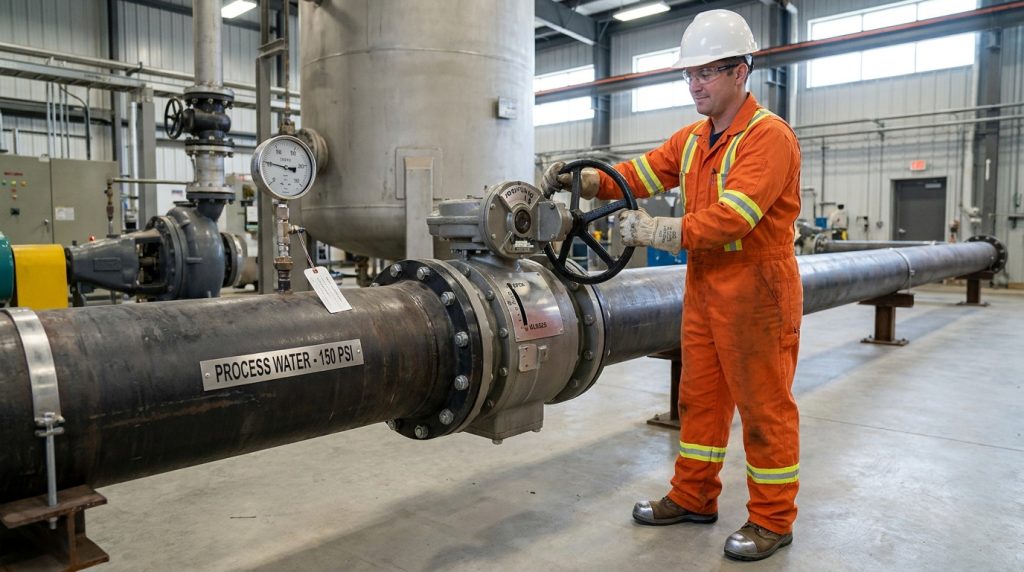
Move the handle, gear, or actuator toward the intended position while watching for abnormal resistance. A manual lever valve may move through the stroke quickly, but a gear-operated valve should be turned steadily until the indicator reaches the correct stop.
Do not force the operator after it reaches the travel stop. Extra force does not improve sealing; it can damage the seat, stem, gearbox, actuator, or stop setting.
After it reaches the stop
After the valve reaches open or closed, check whether the process response matches the expected position. For example, a fully open valve should reduce restriction compared with a partially open valve, while a fully closed valve should stop or sharply reduce flow depending on the valve’s shutoff class.
If the process response does not match the indicated position, do not assume the indicator is correct. The valve may be partially obstructed, the actuator may be out of adjustment, or the seat may not be sealing as expected.
Part Open Does Not Mean Part Flow
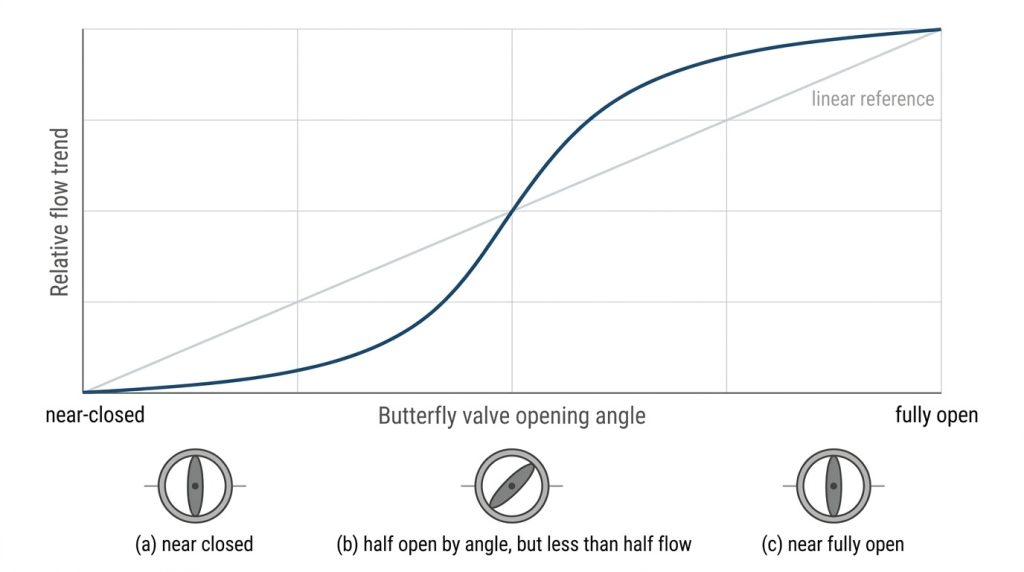
A half-open butterfly valve does not normally give half of the rated flow. Disc angle and flow rate are not linear because the disc shape, velocity, turbulence, pressure drop, and pipe layout all affect the real flow path.
Why is butterfly valve flow nonlinear?
Near the closed position, a small movement can create a narrow high-velocity opening. Near the open position, a similar movement may create a much smaller change in pressure drop because the flow path is already mostly clear.
This is why a valve position such as 30 degrees, 45 degrees, or 60 degrees open should not be treated as a simple percentage of flow. For flow-control work, you need the valve’s Cv curve, opening angle, and operating conditions; a guide to butterfly valve flow vs percent open is a more useful next step than guessing from handle angle.
When should you avoid near-closed throttling?
Avoid long-term throttling very close to the closed position unless the valve and service conditions are designed for it. Low opening angles can increase velocity, vibration, noise, cavitation risk in liquids, and wear on the seat or disc edge.
For smoother control, some butterfly valve installation instructions recommend straight pipe runs such as 10 to 20 pipe diameters upstream and 3 to 5 pipe diameters downstream. Treat those as design-dependent guidance, not a universal rule; final requirements should come from the valve data sheet, control objective, and piping layout.
When Full Closed Is Not Tight Shutoff
Full closed means the disc has reached its closed stop, but it does not automatically prove tight shutoff. A butterfly valve can be fully closed by position and still leak if the seat is worn, the disc is damaged, the pressure direction is outside the intended limit, or the valve was not specified for the required leakage performance.
What affects sealing at the closed stop?
Sealing depends on the relationship between the disc, seat, stem, body, and pressure load. In resilient-seated valves, the elastomer seat provides the sealing contact. In high-performance or offset designs, the disc geometry and seat design control how the sealing surfaces engage near the final part of travel.
Several conditions can reduce shutoff reliability:
- Seat swelling, hardening, cutting, or chemical attack
- Disc edge damage from solids or improper installation
- Misadjusted travel stops that prevent full closure
- Excessive differential pressure during operation
- Wrong seat material for the temperature or medium
- Poor pipe alignment that distorts the valve body
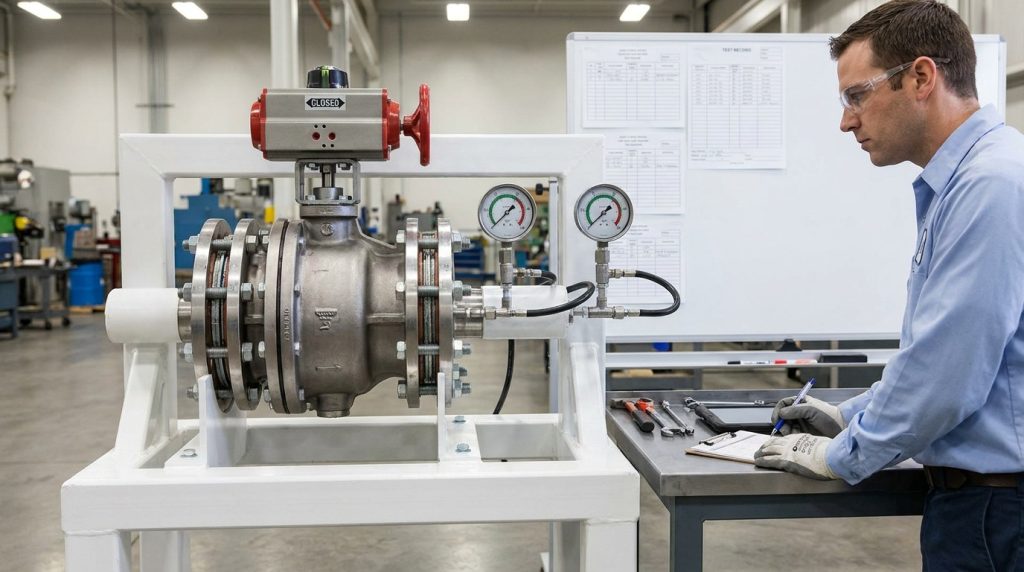
A shut-off butterfly valve should therefore be judged by both position and leakage expectation. If the line requires tight isolation, the purchase specification should state the valve type, seat material, pressure class, test requirement, and acceptable leakage level.
Which position checks matter before service?
Before placing the valve into service, cycle it from open to closed and back if the system condition allows. The goal is to confirm smooth travel, correct indication, and no obvious disc interference.
For new installations, confirm the valve is centered between flanges and that the disc has clearance to rotate. Some installation instructions require the disc to be near closed during installation to protect the seat, but that position is not the same as final service closure.
Position Checks for Automated Valves
Remote indication is useful only when it is mechanically or electrically matched to real valve travel. In automated systems, you should not rely on a control signal alone unless the actuator, valve, limit switches, and local indicator have been set and verified together.
Can remote indication replace local verification?
Remote indication can support normal operation, but it should not replace local verification during commissioning, maintenance, or after actuator adjustment. A switch can say “closed” because it reached its cam setting, not because the disc fully seated.
For applications that require supervised open or closed status, such as certain fire-protection or controlled-access systems, a butterfly valve tamper switch must be installed and tested against the actual valve position. The important point is that the switch must follow the valve stem or operator movement accurately enough for the required signal.

What should a project data sheet confirm?
A project data sheet should confirm how the valve position will be shown, operated, and verified. This is more useful than only saying “manual” or “actuated.”
Include the following when position matters:
- Valve type and size
- Lever, gearbox, pneumatic actuator, or electric actuator
- Fail position, if actuated
- Local open/closed indicator
- Limit switch or position transmitter requirement
- Required shutoff performance
- Seat and seal materials
- Operating pressure, temperature, and medium
- Whether the valve is for isolation, throttling, or control
From a valve manufacturer’s perspective, these details help prevent a common problem: the valve is mechanically suitable, but the operator, signal, or shutoff expectation does not match the real service.
Conclusion
The butterfly valve open and closed position is easy to understand in principle: open means the disc is aligned with the flow path, and closed means the disc turns across the bore. The practical judgment is more careful: verify handle direction, indicator markings, actuator feedback, travel stops, and process response before treating the valve as truly open, closed, or tightly shut off.
If you are confirming valve position requirements for a new project, replacement valve, actuator package, or shutoff duty, prepare the medium, pressure, temperature, connection standard, operation method, and required leakage expectation, then contact RUITO to discuss which valve configuration can be reviewed for your application.
FAQ
Can I tell if a butterfly valve is open just by the handle?
Yes, in many manual lever valves, you can use the handle as a quick position check. Parallel to the pipe usually means open, and perpendicular usually means closed, but this should be confirmed against the position plate or travel stop if the valve has been serviced or modified.
What’s the best way to confirm a butterfly valve is fully closed?
The best method is to check the closed stop, local indicator, and process response together. If tight shutoff is required, position alone is not enough; the valve must also have the right seat design, material, pressure rating, and leakage requirement for the service.
How do I know if a gear-operated butterfly valve is open?
Use the pointer or dial on top of the gear operator and confirm it has reached the open stop. If the pointer says open but the process flow looks restricted, the gearbox stop or indicator may need to be checked against actual disc travel.
Can I leave a butterfly valve partially open for flow control?
Yes, but only when the valve and system are suitable for throttling. A partially open butterfly valve does not produce linear flow, and near-closed throttling can increase turbulence, vibration, and seat wear.
What’s the difference between closed position and tight shutoff?
Closed position means the disc has reached the closed end of its travel. Tight shutoff means the valve also meets the leakage expectation for the service, which depends on seat condition, pressure, materials, and the specified test or shutoff requirement.